Your AI Agent Doesn't Care About Your README
Why traditional docs fail AI agents - and how to generate context they can actually use.
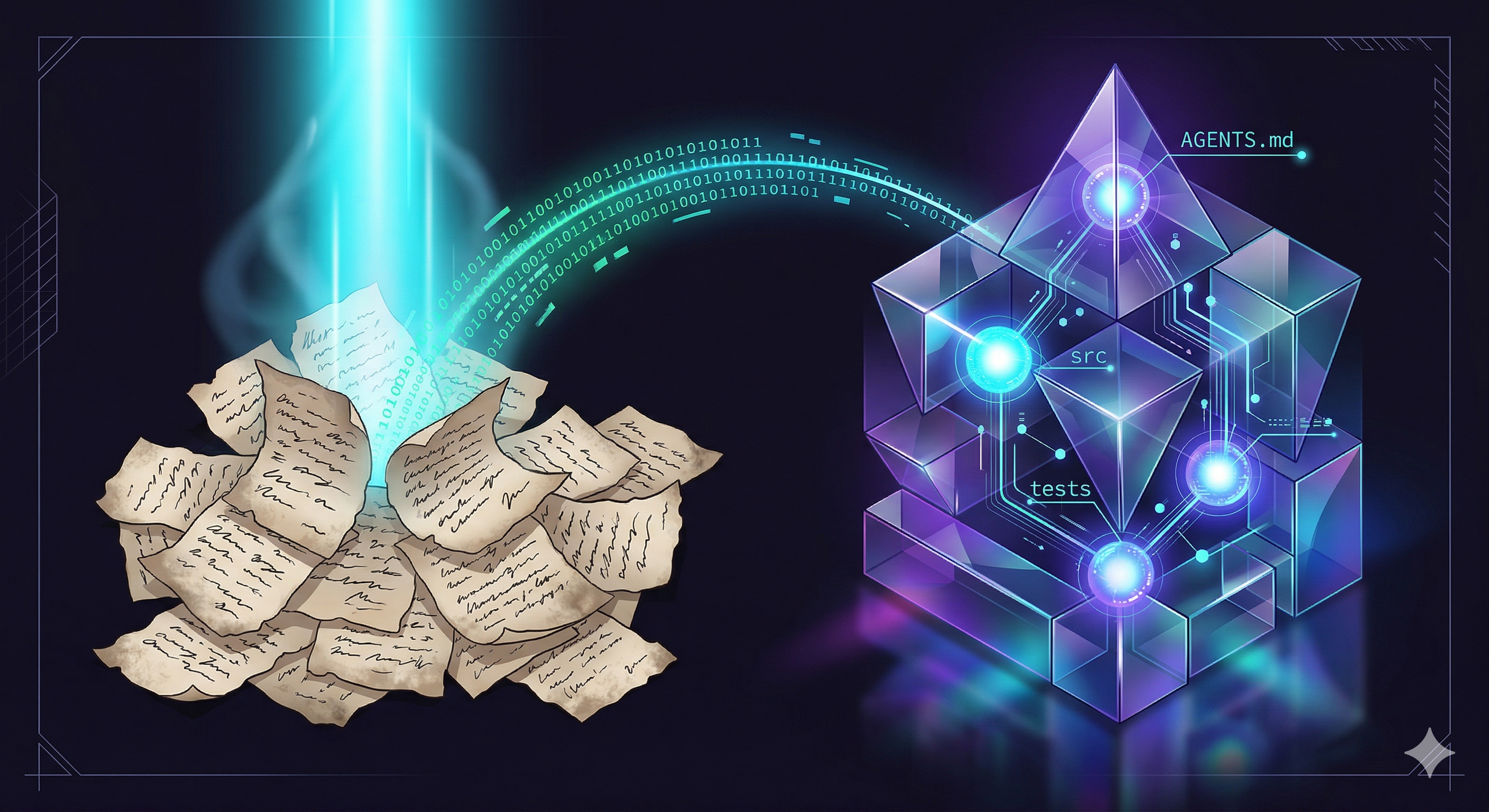
We’re increasingly shifting software development tasks to agents, but we are still documenting for humans.
When a developer joins a new project, they first look at the README file. A README is essentially an overview of the project, installation steps, and other descriptive information. As humans, we’re able to infer from context and ignore irrelevant fluff, which helps us get the full picture. But when a coding agent (such as Cursor or Claude Code) works on a project, it doesn’t need that same fluff. Agents instead need insight into where things live, what rules to follow, and how to implement changes, rather than high-level things that experienced devs already know or can fill in on their own.
What People Are Doing Today
Nowadays, people have begun adding specific files targeted for agents. Similar to how humans have a README.md, AGENTS.md has become useful. This AGENTS.md file contains useful information and technical context that the agent needs, keeping separation so it doesn’t clutter human-facing documentation like README with details we don’t need.
There is also llms.txt, which acts as a sitemap for agents by providing a structured, concise summary of a project’s most important content.
This is a great direction because it gives agents a dedicated place to get the info they need, such as commands, rules, and logic, without assuming they are the same things we humans need to see.
The Limitations
However, there are still limitations to these current approaches.
- Manual process: This process is still mostly manual, requiring developers to either write the files themselves or use AI, which involves writing custom prompts and doing refinement steps that change constantly based on the project. While Claude has a
/initcommand that initializes aCLAUDE.mdfile, it’s limited. It’s usually just a single file at the project root. I’ve even seen articles arguing against using it entirely, claiming the file it creates will “burn tokens, distract the agent, and go out of date faster than a pear on a hot day.” [3] - Stale documentation: Documentation is not continuously updated. As codebases are changed, or features are removed or added, documentation becomes out of date. You can technically re-run
/initto refresh these files, but as an article from AI Hero points out, “You’ll either burn tokens keeping it up to date, or you’ll delete it. Just skip to deleting it.” [3] - Context bloating: There are tools like GitIngest that convert codebases into text files for LLMs, but this often includes lots of irrelevant information, causing context bloating. This leads to models ignoring important details, contributing to worse performance, as well as higher token usage and cost. OpenAI also recommends keeping these
agent.mdfiles to around 100 lines for these same reasons. - Lack of hierarchy: With just one single root file (like the one generated by a simple
/init), we can’t always accurately show the agent the right amount of detail, especially for a large codebase nested within many directories. As AI Hero mentions, a core problem is that “CLAUDE.md is global. Every instruction applies to every session: frontend, backend, docs, database, all of it.” This wastes budget by forcing agents working on CSS fixes to read through database indexing rules. And as we start having multiple agents working in parallel on the same codebase, we can’t rely on a single global file and need a hierarchical structure where the agent is provided context specific to the exact directories it’s working in.
Why I Built This
I found myself struggling with these same issues. I was spending time writing these files manually, but when I tried to use AI to help, it filled them with generic, unhelpful statements and other unnecessary info. It would also often miss details or fail to update as I made code changes.
I wanted a way to automate this process and keep my documentation up to date without thinking about it, so I built a tool to do it for me, hoping this may also help others.
Building A Hierarchical Context Compressor
What if your repo automatically generated its own structured, agent-optimized context?
I built a tool called hcc (Hierarchical Context Compressor) to automate this. Instead of one giant unmaintainable file, it creates a hierarchy of files with one AGENTS.md per relevant subfolder.
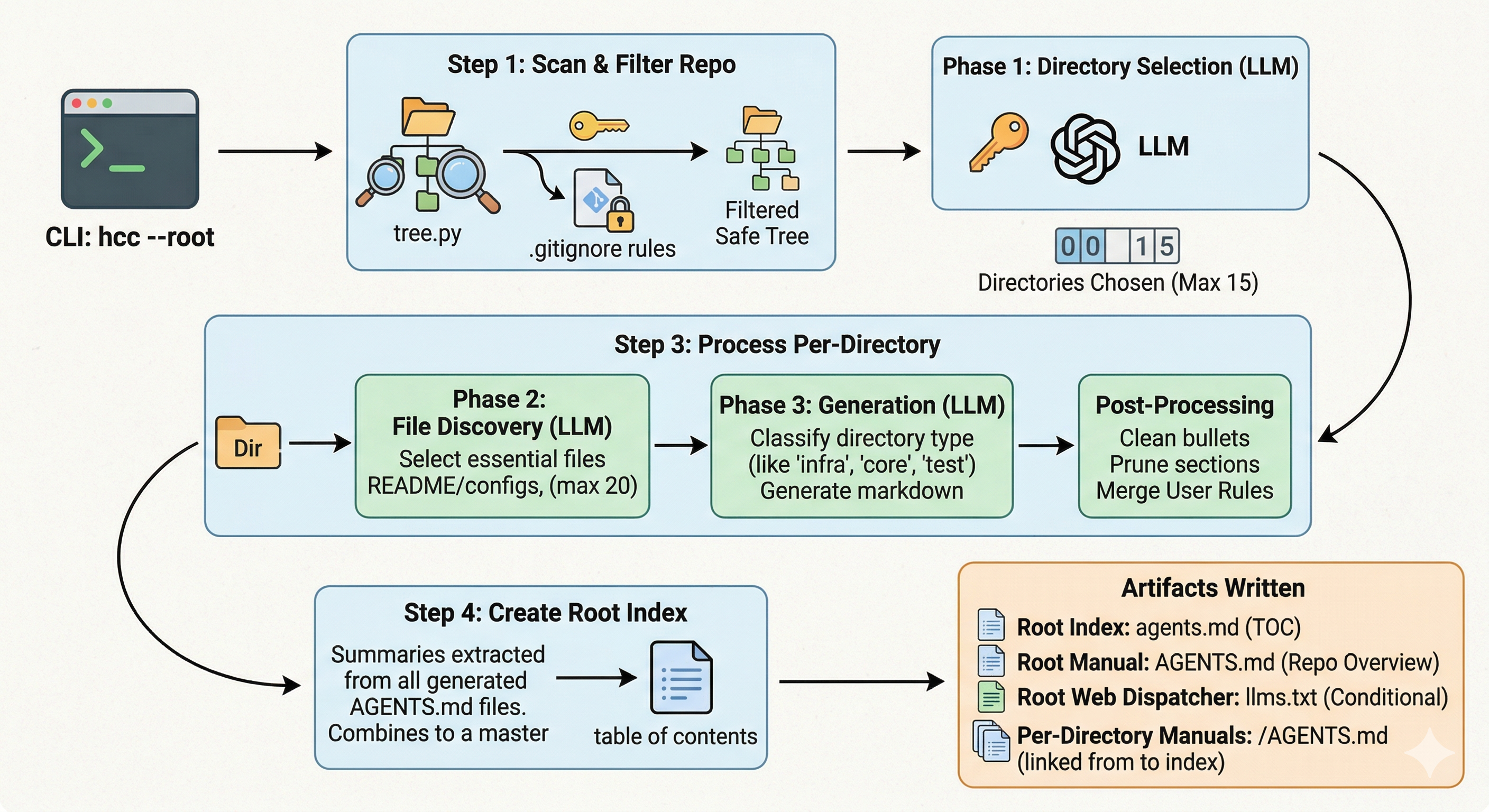
The tool uses a 3-step pipeline to guide the process and ensure the output is useful:
- Instead of throwing the whole repo into one prompt, the tool starts by looking at the entire file tree. It uses a smaller model (
gpt-4o-mini) and decides which directories actually matter, ignoring low-information ones likenode_modulesor.git, and picking significant folders that contain core logic and functionality, testing, or documentation. This reduces noise and cost. - Once it picks the significant folders, it does a second pass to find specific entry points and config files for only those areas. It chooses to read the most relevant files, which helps avoid overloading the LLM with unnecessary code.
- Finally, it generates the
AGENTS.mdfiles for those folders. For this part, the tool classifies the current folder into categories such as Core, Tests, Docs, and Infra, then decides which prompt/persona to use based on that classification. A Tests folder gets a prompt focused on mocking and test runners, while a Core folder gets one focused on exported APIs and architectural boundaries.
I noticed that LLMs often add fluff and generic advice, like “follow best practices,” so I added a filter to prevent this. If the tool detects empty phrases, it prunes them out, leaving a direct, concise set of instructions.
I also needed the ability to keep my own manual rules. So if you’ve already written custom instructions for a folder, the tool won’t delete them and will instead merge your notes with AI-generated context. It also knows when to create llms.txt (for web apps) or just stick to AGENTS.md.
To ensure this works in large production repos, I added token/size limits: max 8,000 characters per file and 40,000 total characters per directory discovery. Even with lots of information available, this forces the LLM to focus on the most important code rather than getting “lost in the middle,” where models struggle to retrieve relevant information from long contexts.
Before vs After: What Agents Actually See
To make this more concrete, I tried this on one of my projects.
Before:
If you use a generic prompt with an LLM and ask it to generate AGENTS.md, it might do something like:
# AGENTS.md

## Project Overview
This project is a backend API built with Express.

## Structure
- src/routes handles API routes
- src/services contains business logic
- src/utils contains helper functions

## Guidelines
- Follow existing patterns in the codebase
- Write clean and maintainable code
- Ensure proper error handling

## Notes
- Use middleware for authentication
- Keep code modular and reusable
This looks okay at first glance, however it is flawed and can break down in practice for a few reasons:
- The instructions are vague. Simply writing “follow patterns” doesn’t clearly tell the agent what to do.
- There is no file-level specificity, and nothing points to actual entry points.
- This is not scoped to where the agent is working, leaving the agent to still explore the repo manually.
As a result, even with this file, the agent is still left to do a lot of guessing, not because the file is wrong, but because it is not specific enough to guide execution.
After (with tool):
Here’s a real example generated from one of my projects (mooterview.com):
## Local Agent Context: src

## Setup & Commands
- Run server: `node src/server.ts`
- Lambda entry point: `app.ts` (via `serverless-http`)
- Required env var: `PORT`

## Key Entry Points
- `server.ts` -> local server startup
- `app.ts` -> serverless entry
- `src/routes/index.ts` -> central route registry

## Rules
- All routes must be registered in `src/routes/index.ts`
- Protected routes must use `middleware/authorizer.ts`
- Do not implement auth logic inside route handlers
- Follow middleware + setup patterns in `app.ts` / `server.ts`

## Adding a New Route
- Create file: `src/routes/newFeature.route.ts`
- Export a router
- Register in `src/routes/index.ts` via `router.use(...)`
- Apply `authorizer` if auth is required

## Adding a New Service
- Create file in `src/services/[feature]/`
- Export reusable functions
- Import into route handlers

## Tests
- Mirror `src/` structure inside `test/`
- Use `mocha` or `jest`

## Config
- Add params to `PUBLIC_CONFIG_PARAMETERS` in `src/services/config/getPublicConfig.ts`
- Map keys inside `getPublicConfig()`
What This Looks Like in Practice
To see why this matters, consider an example action: an agent needs to add a new authenticated API route.
If we do not provide proper structured context, the agent has to search multiple folders, guess where routes are, and figure out which routes need authentication and how that’s handled. With properly generated context, we can provide exact guidance on where to look and what patterns to follow. It can reference the right files, see which routes require authentication, and follow existing patterns without exploring the whole repo or risking mistakes.
Possible Extension: Separating Reference vs Instructions
One thing I’m still considering is splitting context into two layers:
AGENTS.md-> strict instructions, rules, constraintsREFERENCE.md-> commands, environment setup, tool-calling, and general knowledge
Right now, some of this (like commands) lives inside AGENTS.md, but it might be cleaner to separate execution rules from reference info. This could reduce noise further and make context more composable for agents.
How to Run It
It’s a CLI tool, so you can run it locally or as a GitHub Action to keep your docs updated on every push:
uv tool install git+https://github.com/reyavir/hierarchical-context-compressor.git
hcc - root .
If you want to preview what hcc will generate without writing files:
hcc - root . - dry-run
Conclusion
We’re moving towards a future where agents are becoming a larger part of our development process. But to ensure they are helpful and effective in improving our codebases, we need to provide them with the right context and map to navigate and understand the codebase.
I’m curious to see if this helps other developers who are tired of manual context management. If you have thoughts on how to make this more efficient, let me know, or check out the project on GitHub!
References
- Agent.MD standard: https://agents.md/
- Claude Code Best Practices: https://code.claude.com/docs/en/best-practices#write-an-effective-claude-md
- Never Run Claude /init: https://www.aihero.dev/
- GitIngest: https://gitingest.com/
- Evaluating AGENTS.md: Are Repository-Level Context Files Helpful for Coding Agents?: https://arxiv.org/abs/2602.11988
- Lost in the Middle: How Language Models Use Long Contexts: https://arxiv.org/abs/2307.03172