9 Critical Failure Patterns of Coding Agents
In this part of the mini series, we look at the specific failures that happen when you try to build real applications with AI.
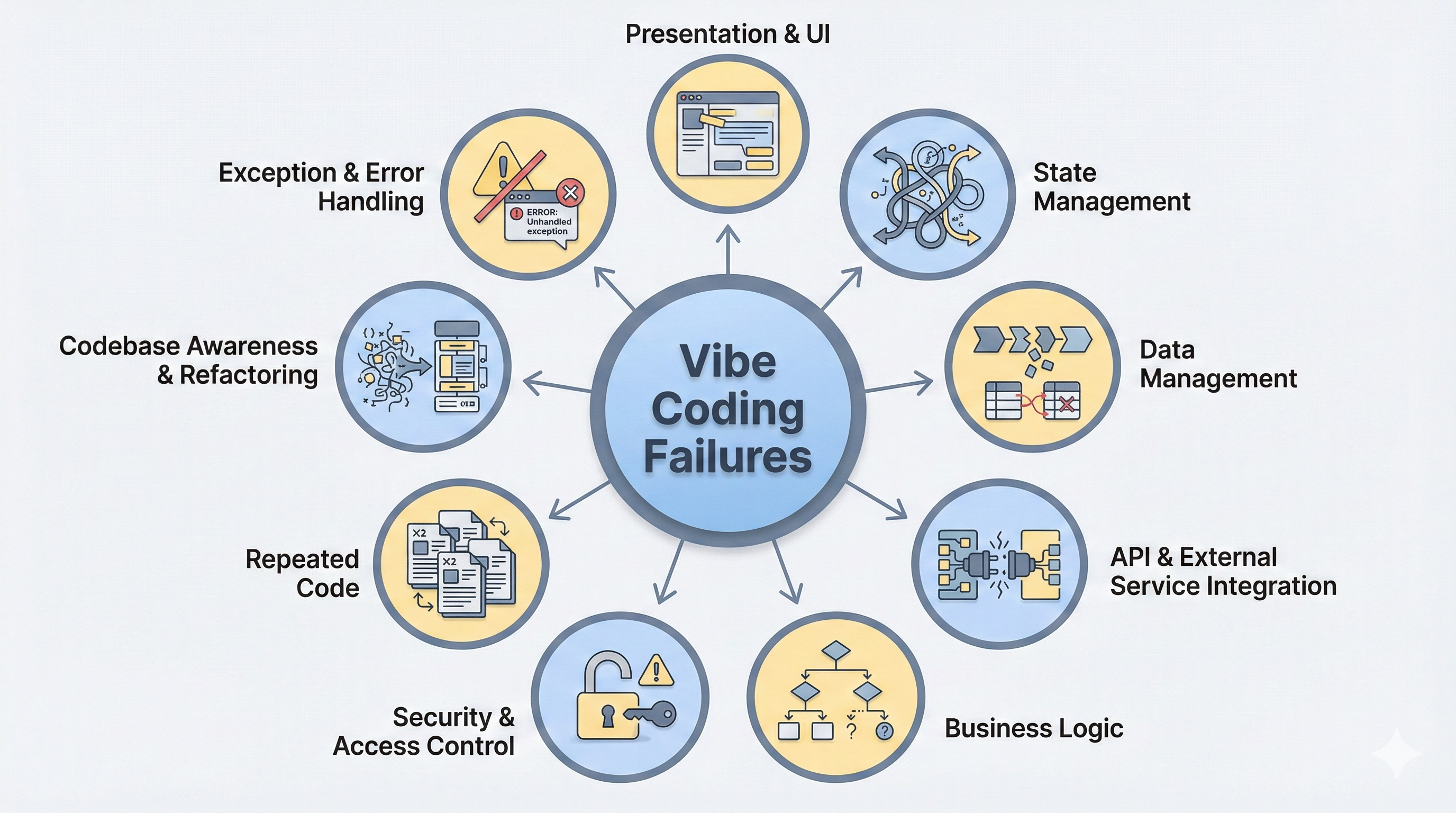
Vibe coding is excellent for prototyping, but once you move beyond a simple demo, features start to break[1][2]. While vibe coding removes the need to read code, it also creates a misalignment gap between the user and the agent: users describe requests based on what they see, while agents operate based on the code. This gap leads to half-finished apps, hidden bugs, and silent failures, making debugging and deployment inaccessible.
Our Investigation
Existing research attempts to measure the quality of vibe coding, but it relies on verifying fixed outputs. Current benchmarks focus on unit tests[3], single-shot coding[3], or visual design[4]. However, these metrics don’t entirely cover the reality of vibe coding. Building an application is an iterative process and requires holistic system validation. Components must function together and cannot be tested in isolation. We seek to understand the implications of this complexity and identify exactly where agents fail in the app development process.
To study this, we iteratively vibe-coded 15+ applications using 5 state-of-the-art coding agents and vibe-coding tools. We made sure to exercise the most important features, ranging from business logic, user interaction, security, and iterative development. We documented every failure during development, from minor UI bugs to app crashes, and categorized the hundreds of failures into 9 distinct failure patterns that represent the most frequent and high-impact bugs across the agents (summarized in Figure 2 below).
| Failure Pattern | Claude | Cline | Cursor | V0 | Replit |
|---|---|---|---|---|---|
| 1. Presentation & UI Grounding Mismatch | |||||
| 2. State Management Failures | |||||
| 3. Business Logic Mismatch | |||||
| 4. Data Management Errors | |||||
| 5. API & External Service Integration Failures | |||||
| 6. Security Vulnerabilities | |||||
| 7. Repeated Code | |||||
| 8. Codebase Awareness & Refactoring Issues | |||||
| 9. Exception & Error Handling |
Summary of the Failure Modes
These agent failures (Figure 2) reveal three big findings:
-
Exception & Error Handling (Category 9): We found that agents prioritize runnable code over correctness, and repeatedly choose to suppress errors rather than communicating to users that there is a mistake.
-
Business Logic Mismatch (Category 3): Agents struggle to implement business logic and rules. They often misunderstand the user’s specified constraints (like pricing rules) and fail to tie them correctly into the existing app.
-
Codebase Awareness & Refactoring Issues (Category 8): Agents make increasingly more failures as the number of files in the codebase grows, sometimes mixing up or forgetting to incorporate changes to some components when refactoring.
While there is considerable research and software products that tackle some of these failure modes, the reality is that many of these failures go beyond agent design. They ultimately will require addressing deficiencies in the underlying systems as well as new human computer interaction designs to surface and make these issues accessible to a new class of vibe coders that are not professional software engineers.
The 9 Critical Failure Patterns
The rest of this post describes each of the failure modes, along with an example where it manifests.
1: Presentation & UI Grounding Mismatch
Agents struggle to translate visual requests into code. Since they cannot see the interface, they often fail to understand spatial requests, like moving a button, resizing a component, or aligning items. This leads to layouts and styles that do not match what the user intended.
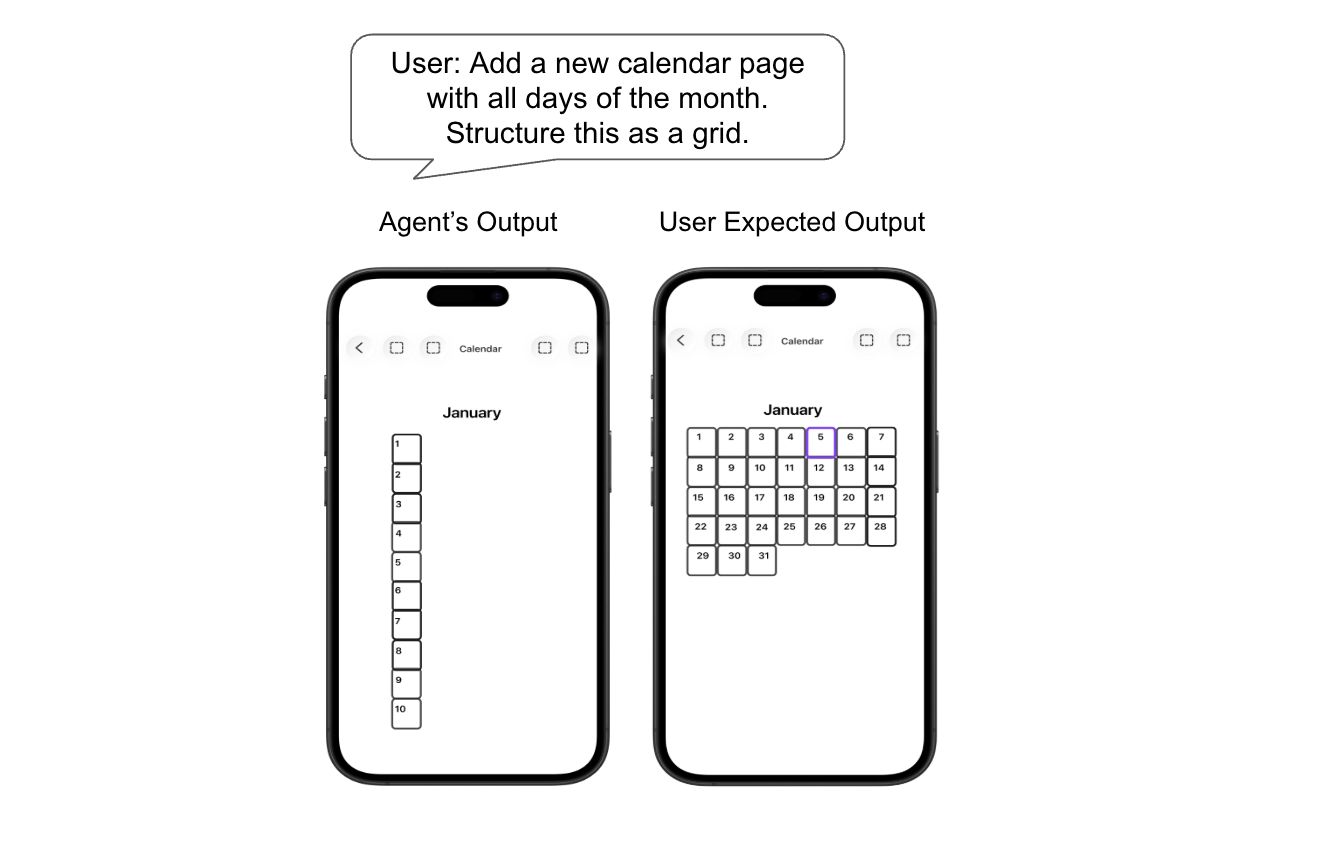
Example: The user asks the agent to build a calendar and display it as a grid. The agent generates the correct calendar data, but displays the days in a single vertical line instead.
2: State Management Failures
As users interact with an application, the system must maintain the in-memory state that is reflected in the interface—for example, the contents of a shopping cart, the ordering of list items, or the current step in an installation flow. The agent often fails to manage shared state between components when refactoring and struggles to even understand what state to store and maintain.
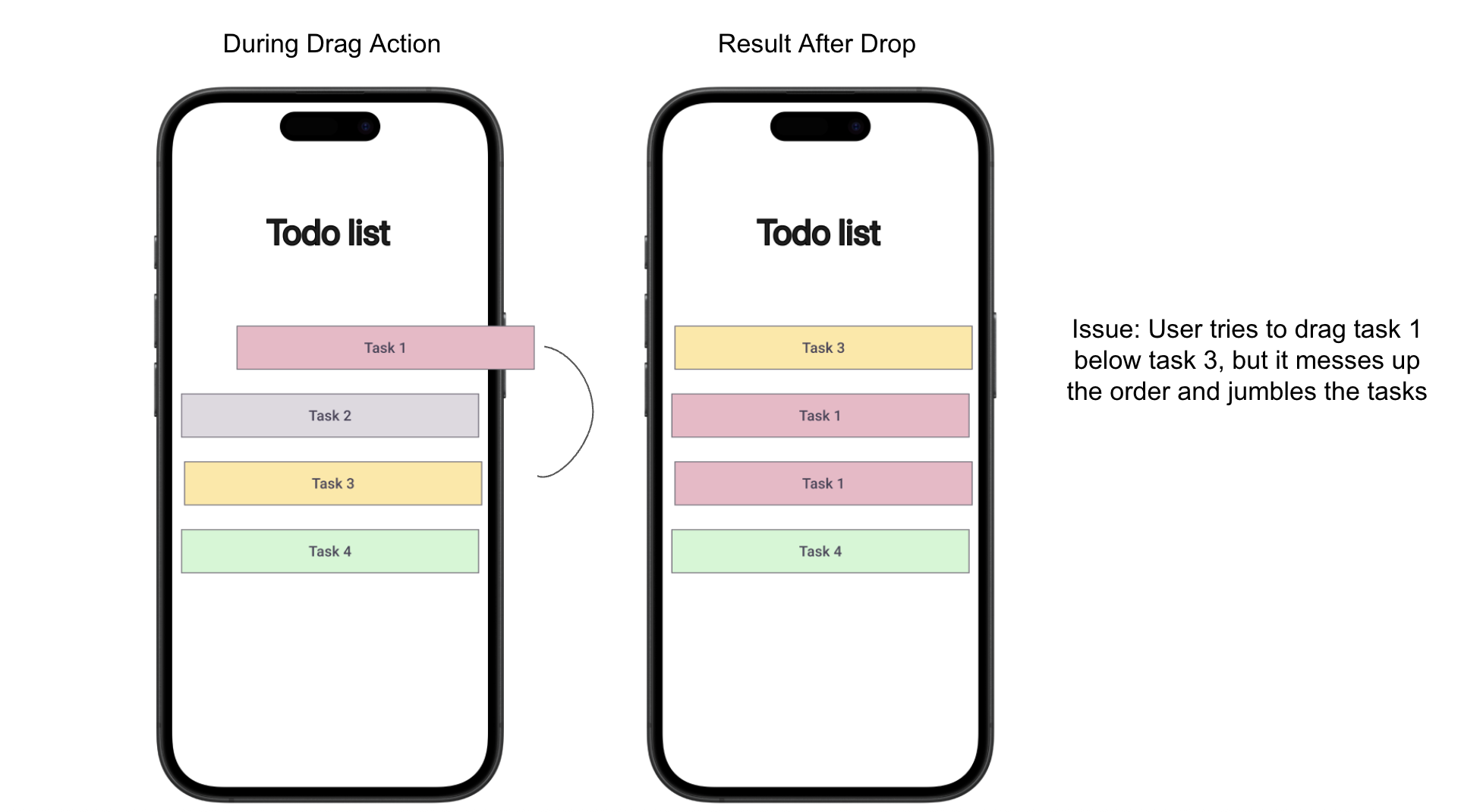
Example: In a to-do list app, a user drags Task 1 below Task 3 to reorder items. The agent updates part of the state but fails to reconcile the full list order, resulting in the wrong order.
3: Business Logic Mismatch
Business logic is crucial and ubiquitous in every application. It defines the rules, permissions, and calculations needed for the use case. Unfortunately, despite its importance, agents often fail to correctly implement these core rules. They might write code that runs without errors, but it produces the wrong output because the underlying logic is flawed.
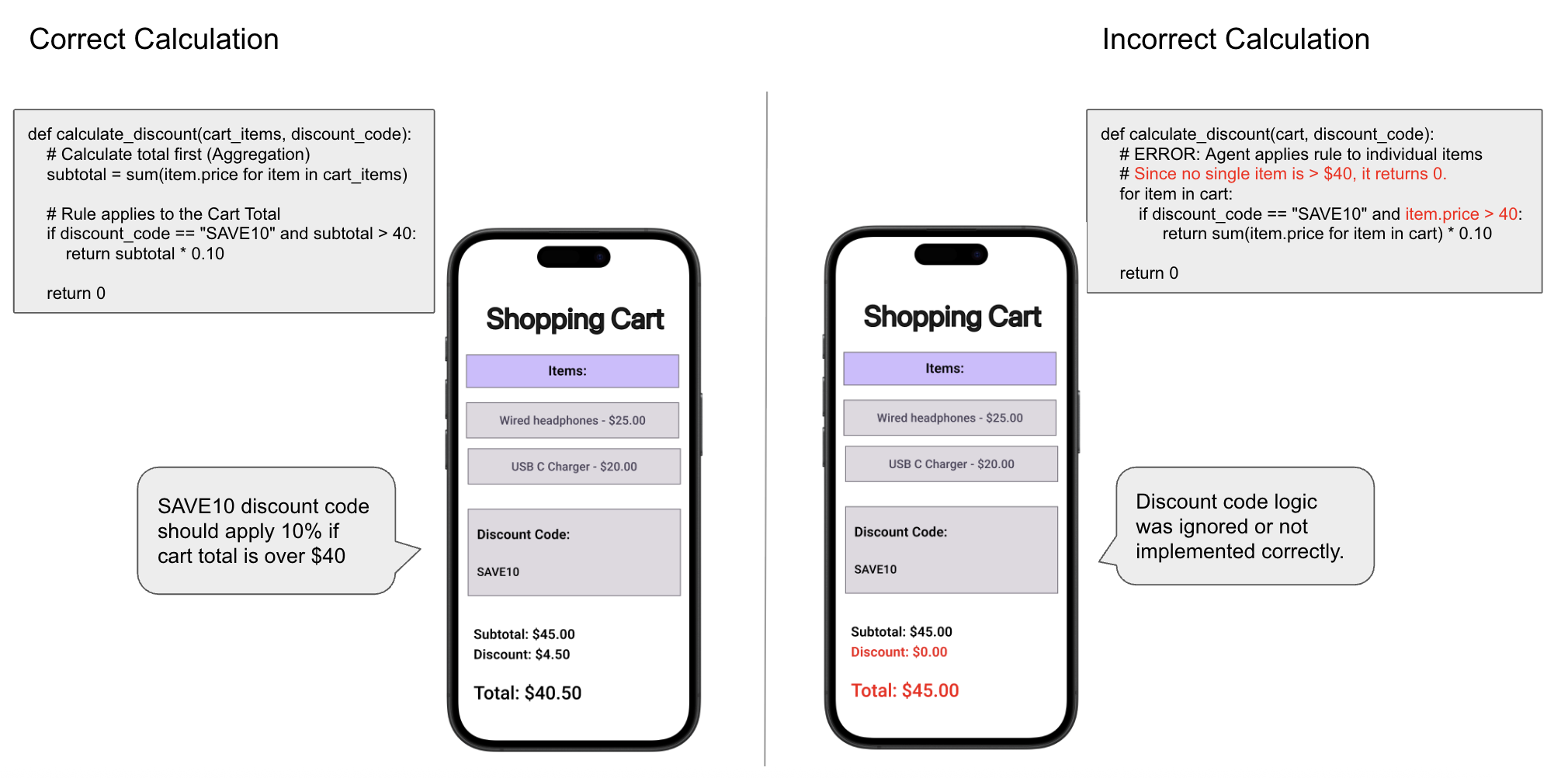
Example: In a shopping application, the business rule requires a 10% discount to be applied to orders over $40, by applying the 10% off on the entire cart price (left side). The agent might miscalculate the shopping cart total by instead applying 10% to individual items that are over $40, resulting in incorrect pricing shown to the user (right side).
4: Data Management Errors
Every application stores data in a database, but this requires designing a schema and issuing the appropriate SQL or database queries to query and update its contents. Despite considerable research and progress to improve natural language to SQL[5][6], vibe coding agents still struggle with data logic and fail to understand the data model (even one it generated itself!). This lack of schema awareness leads to poor database design, like creating redundant columns or failing to update the schema when new prompts are given.
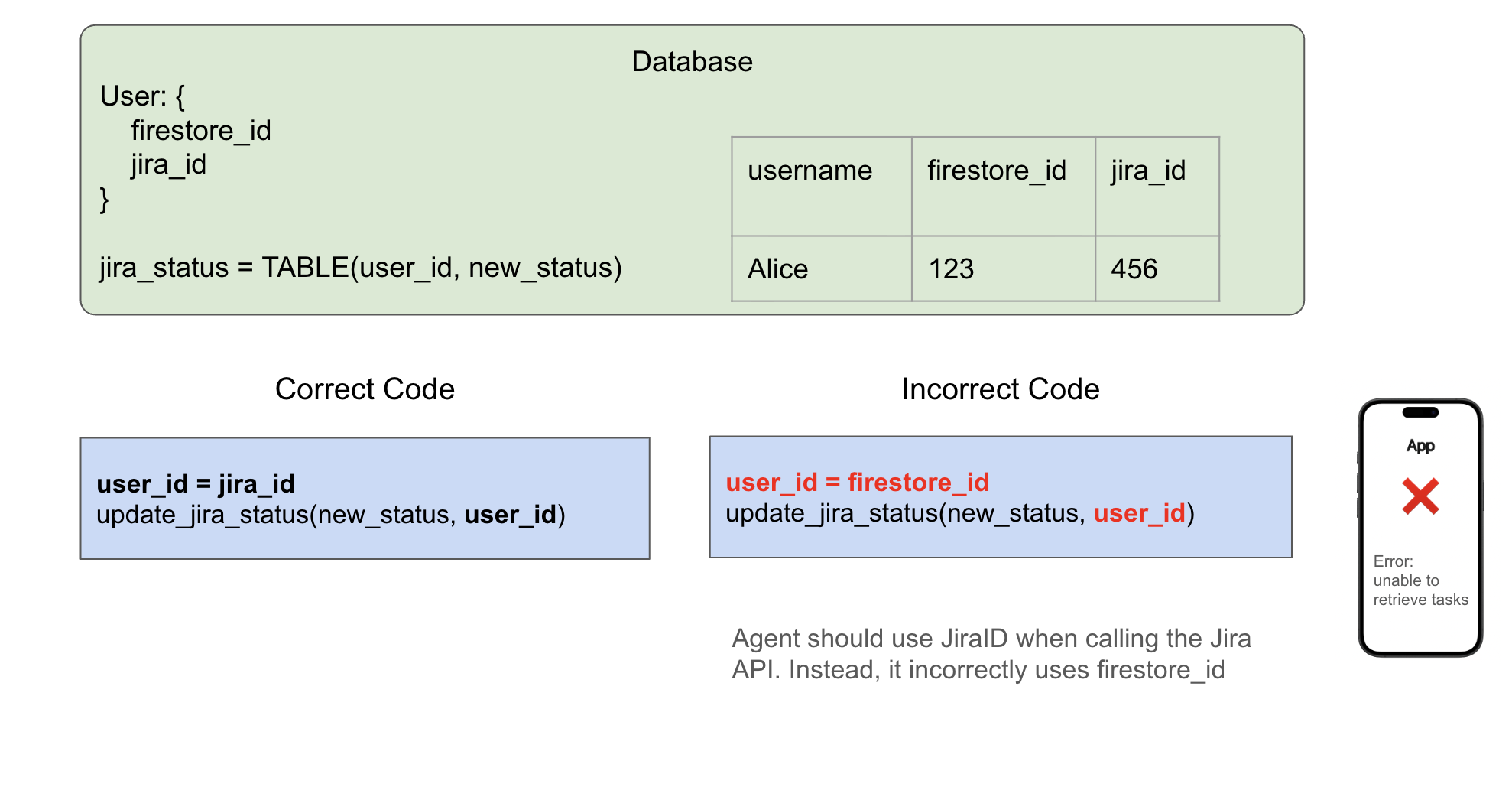
Example: The agent needs to update the status of a Jira ticket. The green box shows the database containing both a firestore_id and a jira_id. To correctly update the status, the agent should pass the jira_id into the update function (left). Instead, the agent gets confused and passes in the firestore_id (right), which leads to data retrieval errors.
5: API & External Service Integration Failures
Apps often need to communicate with external services, but agents frequently fail to call APIs correctly[7]. The agent may prioritize code that appears to cause changes in the UI, instead of code that functions as expected. For instance, it may hallucinate fake inputs like environment variables or API keys instead of asking for the real values.
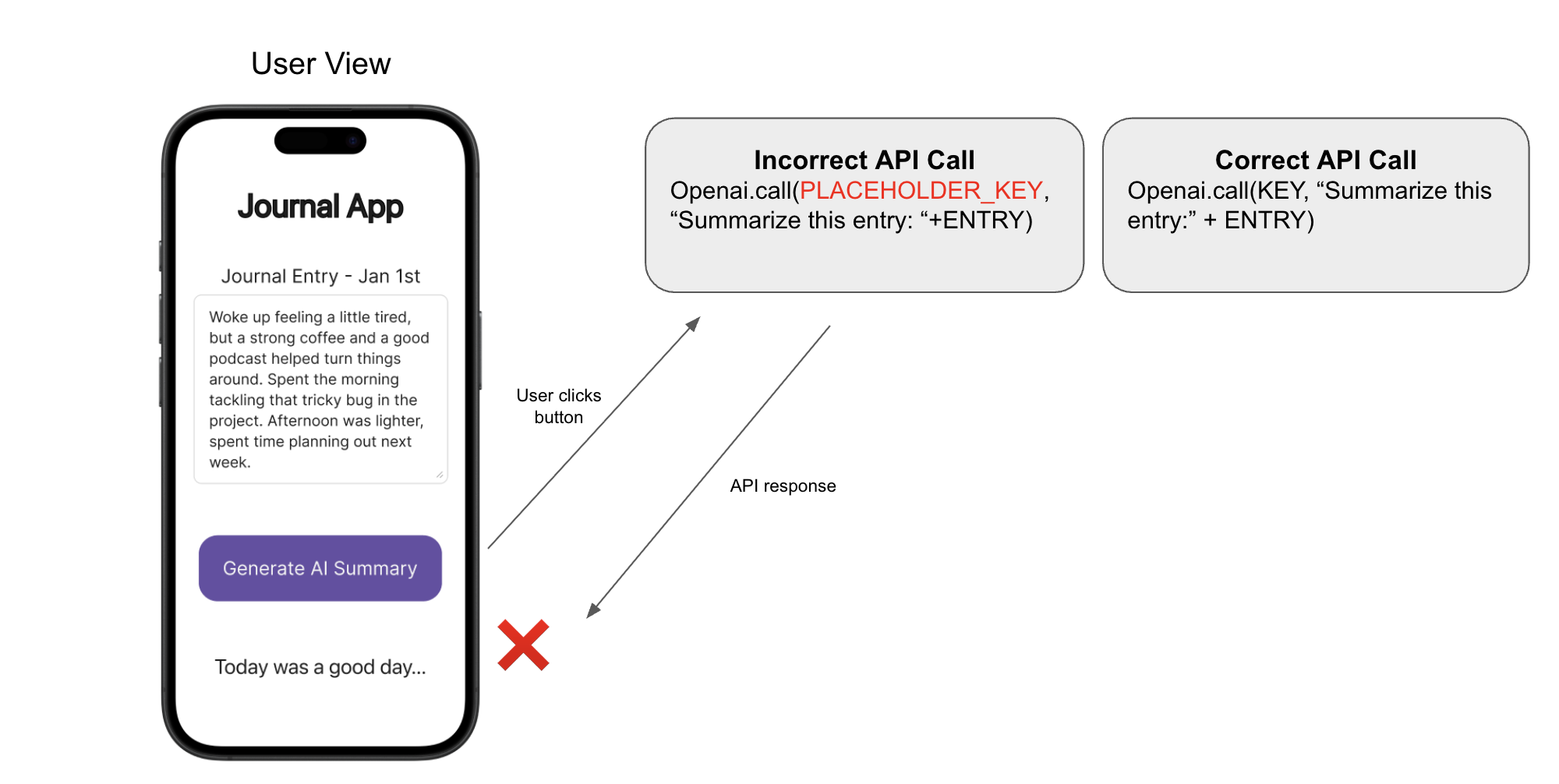
Example: In a Journal app, the user clicks the “Generate AI Summary” button to create a short summary title based on their current journal entry. The agent had implemented the feature using a placeholder key instead of asking for a real one, and so the call fails. Because the API call failed, the user is left with a default hardcoded response (“Today was a good day…”) instead of the actual summary they expected.
6: Security Vulnerabilities
Agents often introduce security vulnerabilities – even basic ones. They lack an understanding of data sensitivity and access control. They choose the easiest way to answer users’ queries rather, often ignoring safety checks. As a result, they frequently expose sensitive data like API keys, or misunderstanding access control.
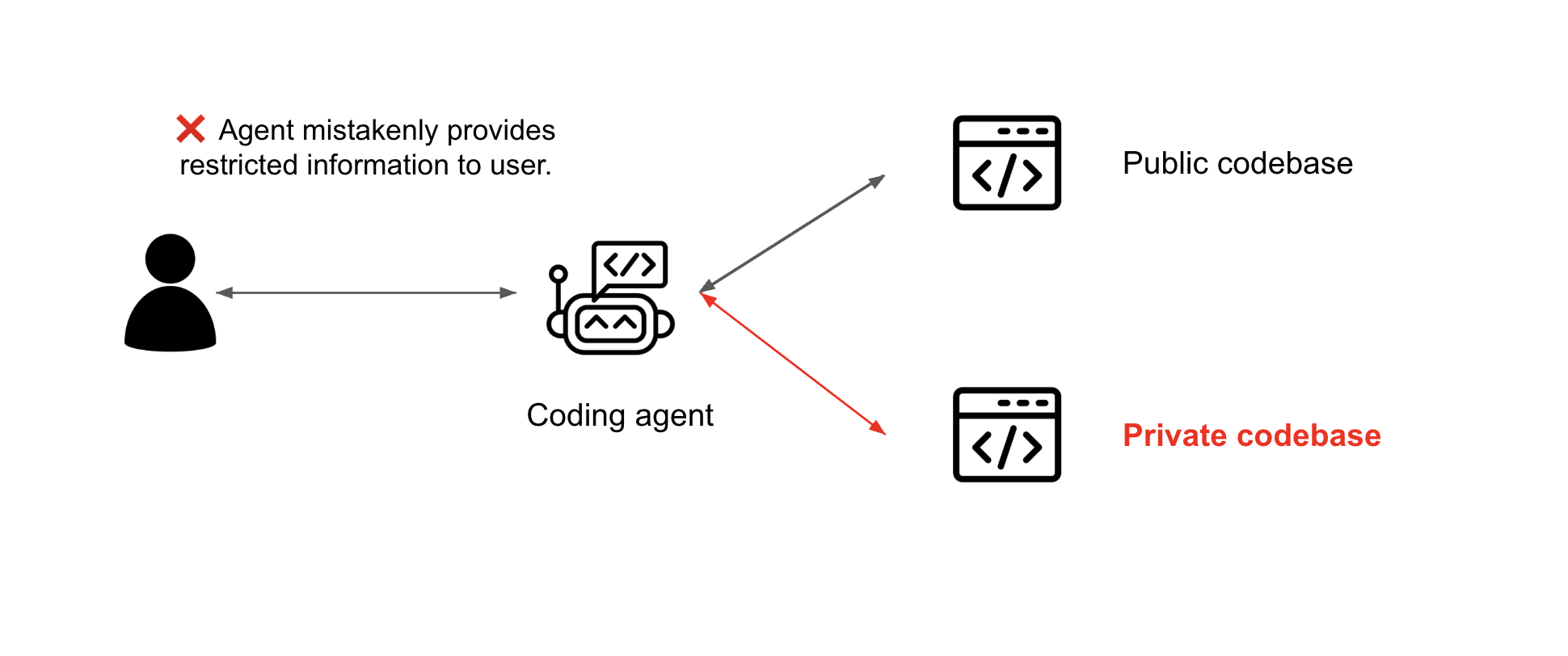
Example: A user interacts with a coding agent that has access to both public and private codebases. The agent fails to separate roles for a ‘regular user’ and an ‘admin,’ and accidentally provides answers from a private admin codebase to regular users, exposing internal data.
7: Repeated Code
Agents often write repeated code, adding duplicate functions with very similar logic rather than abstracting it. This leads to a confusing and unmaintainable codebase, making debugging harder for both the user and agent.
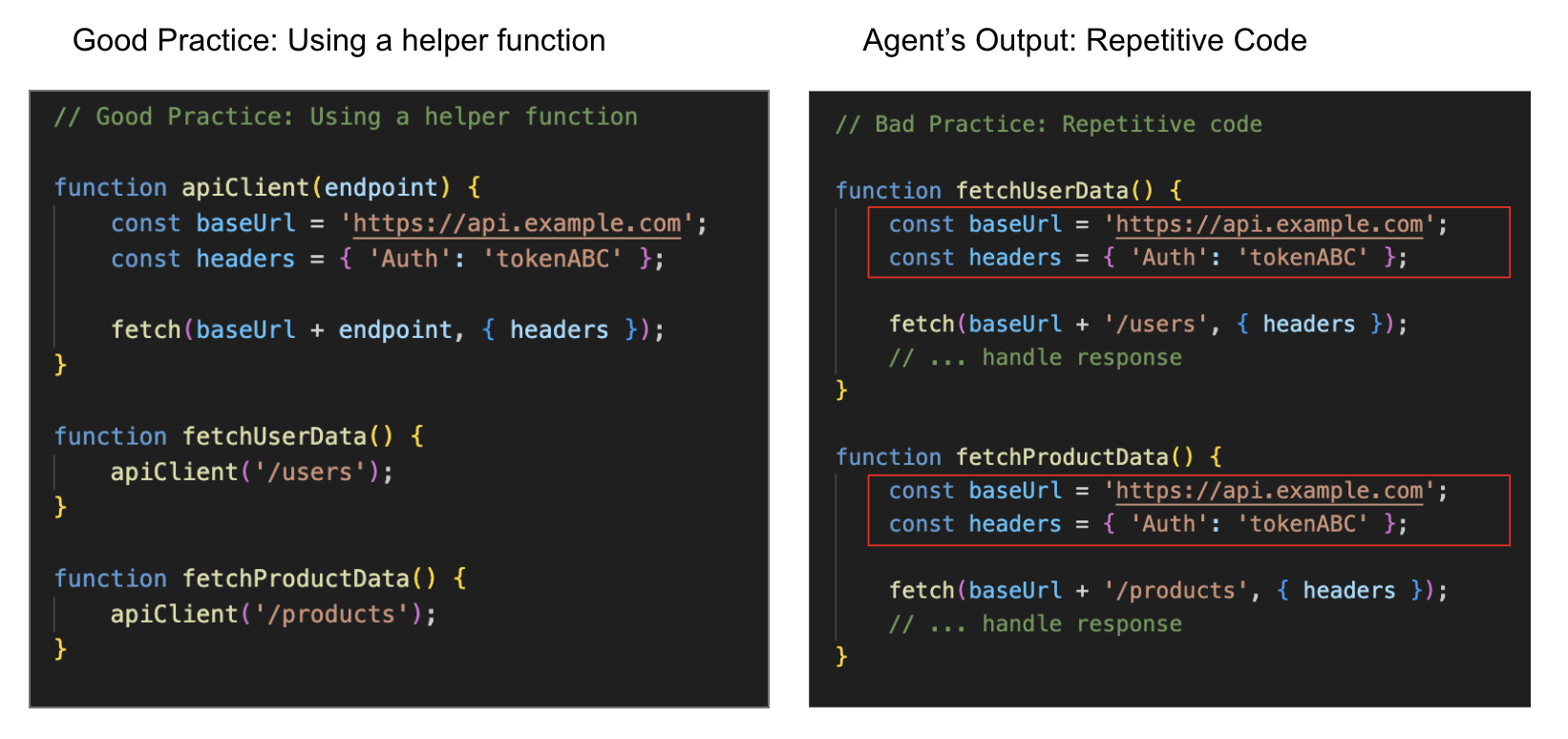
Example: The agent duplicates the API setup code in both fetchUserData and fetchProductData instead of using a shared helper. This creates a maintenance burden: if the API token changes, the user must manually find and update it in every single function.
8: Codebase Awareness & Refactoring Issues
Agents lose context in larger projects. As more files are added, the agent loses track of the overall architecture. As a result, the agent may mistakenly edit the wrong component or introduce breaking changes. We call this the lack of codebase awareness. As a byproduct, agents also fail to refactor code appropriately when adding or editing application features. For instance, they often re-implement an algorithm from scratch, rather than using a well-established software package.
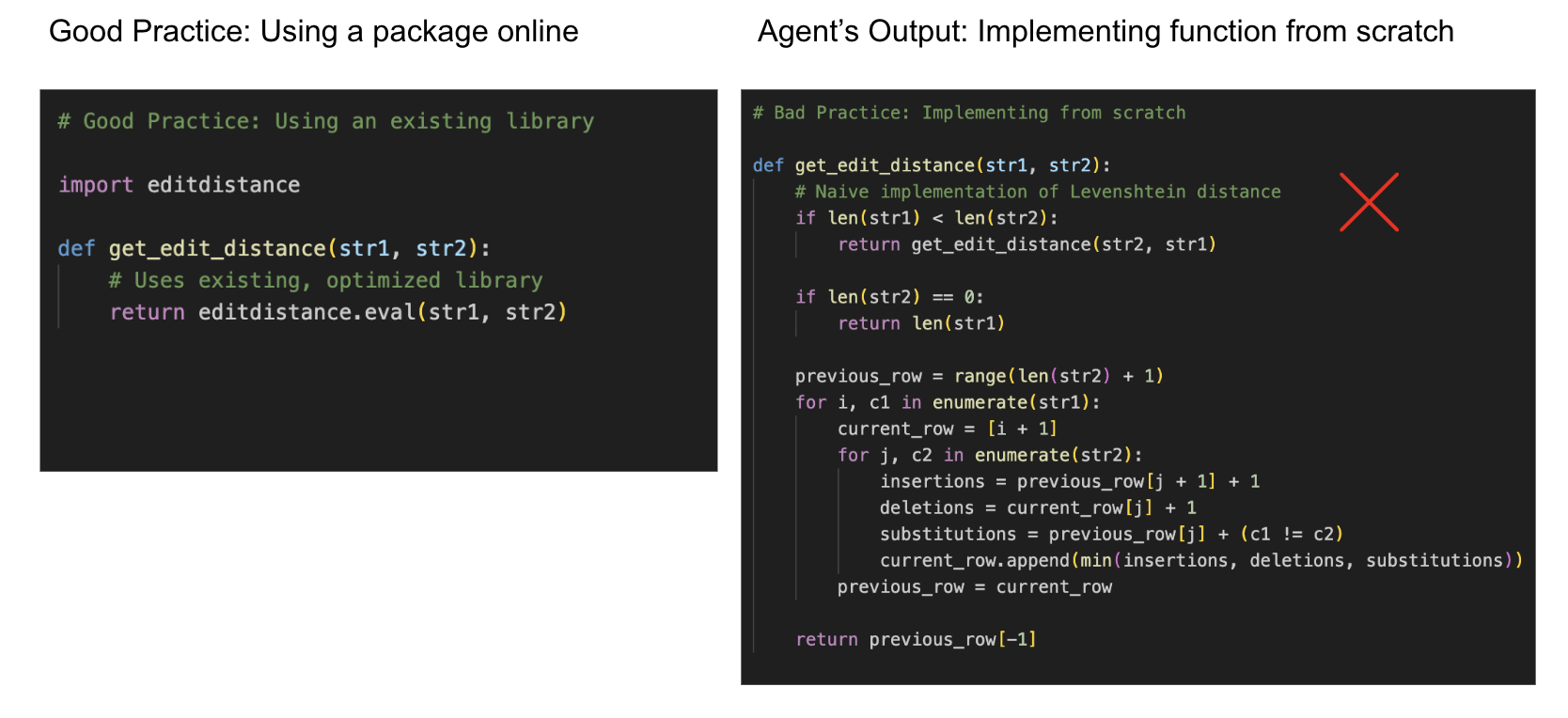
Example: In the figure, the agent needs to compute the edit distance between two strings. Rather than simply importing the existing editdistance library (left), the agent manually implements the entire Levenshtein algorithm from scratch (right). This adds unnecessary complexity, making the code harder to read, maintain, and debug.
9: Exception & Error Handling
The agent prioritizes execution over correctness. Agents often implement just enough error handling so that the app runs end-to-end without crashing, but fails to inform the user when things go wrong. This creates code that convinces us it works because it runs. But in reality, the agent has failed to add proper logic (like clear failure messages or retry logic), leaving both the user and the agent blind to the error.
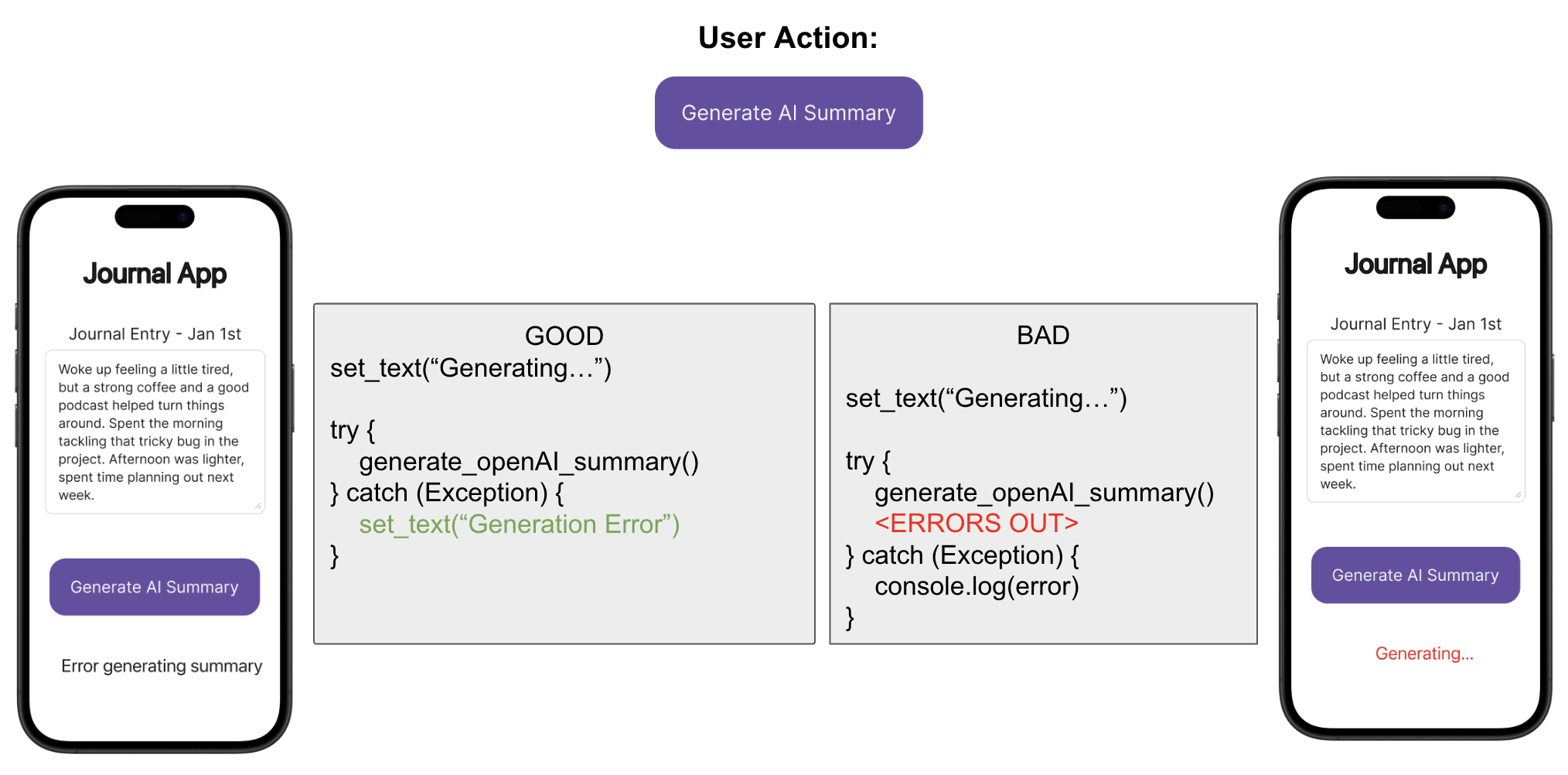
Example: In a Journal App, the user clicks “Generate AI Summary” and the app fails in the backend. The agent’s code catches the error but silently logs it in the developer console without updating the UI. The user is left seeing a stuck “Generating…” message, but the actual error is hidden in the developer console–a layer that vibe coders typically do not (and shouldn’t have to) check.
Why these Failure Patterns are Critical
Traditional software bugs are visible, leading to clear failures like crashes and red text. In contrast, vibe coding bugs are silent.
Agents implement surface-level error handling in a way to make the app appear as if it’s functioning as expected. They use placeholders or ignore key failures. But agents suppress these errors from users, leaving them unaware of what is actually going on. When bugs eventually surface, the root cause becomes very difficult to isolate and debug.
What is Vibe Debugging?
Vibe debugging is the practice of identifying and fixing the bugs that coding agents introduce. It requires understanding the disconnect between visual expectations and code implementation, recognizing silent failures, and systematically addressing the 9 failure categories.
Future Work
Identifying and understanding these limitations is just the first step. We are actively working on ways to make vibe debugging easier and faster. We will be sharing our progress soon, so keep an eye out for future blog posts.
References
-
Mathews, Noble Saji, and Meiyappan Nagappan. “Is Your Automated Software Engineer Trustworthy?” ArXiv.org, 2025. Accessed 8 Jan. 2026.
-
Mathai, Alex, et al. “CrashFixer: A Crash Resolution Agent for the Linux Kernel.” ArXiv.org, 2025. Accessed 8 Jan. 2026.
-
Jimenez, Carlos E., et al. “SWE-bench: Can Language Models Resolve Real-world Github Issues?.” ICLR. 2024.
-
Si, Chenglei, et al. “Design2code: Benchmarking multimodal code generation for automated front-end engineering.” Proceedings of the 2025 Conference of the Nations of the Americas Chapter of the Association for Computational Linguistics: Human Language Technologies (Volume 1: Long Papers). 2025.
-
Hong, Zijin, et al. “Next-generation database interfaces: A survey of llm-based text-to-sql.” IEEE Transactions on Knowledge and Data Engineering (2025).
-
Gao, Dawei, et al. “Text-to-SQL Empowered by Large Language Models: A Benchmark Evaluation.” Proc. VLDB Endow. (2024).
-
Patil, Shishir G., et al. “Gorilla: Large language model connected with massive apis.” Advances in Neural Information Processing Systems 37 (2024): 126544-126565.